 Slap Alert
Buy
Slap Alert
Buy
Stripe sale notifications on your Mac
If you want to see every Stripe sale on your Mac, get Slap Alert: a menu bar app for macOS 14 Sonoma or later, currently US$19 once, with a 7-day free trial. It checks Stripe every 30 seconds with a restricted key that has only Charges: Read and Invoices: Read, keeps that key in your Mac's keychain, and refuses full secret keys. For every new sale, a pixel monkey slaps a sticky note on your screen with who paid and how much. It's one note per sale, not a revenue dashboard.
For macOS 14 Sonoma or later · One-time purchase, currently US$19 · 7-day free trial · Full refund within 14 days
Set it up in two minutes
-
Open Slap Alert
He grabs a vine in the top-right corner of your screen and hangs there. Click him and he climbs out of sight, but still drops in for every sale.
-
Paste a read-only Stripe key
In Stripe, make a restricted key with
Charges: ReadandInvoices: Read, nothing else, and paste it into Slap Alert. Full secret keys (they start withsk_) are refused. -
Make a sale
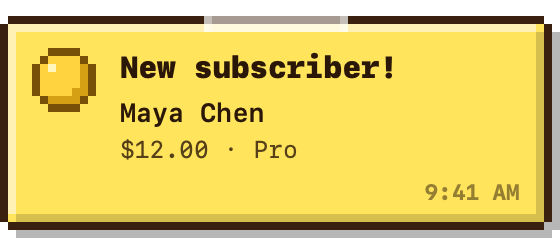
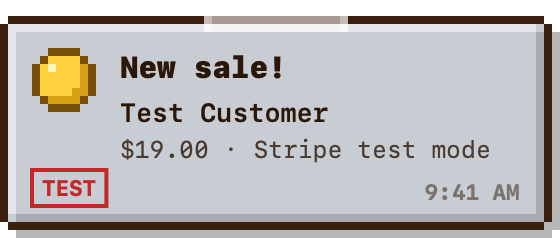
New customers get a yellow note, renewals a blue one. Test-mode payments get a grey note stamped TEST, so you can try it before your first real sale. Only payments made after you connect get a slap.
The note he slaps
Is it safe to give Slap Alert my Stripe key?
Yes. Here's exactly what happens to it:
- Read-only. The key has
Charges: ReadandInvoices: Readand nothing else. A read-only key can't move money. - No full secret keys. Slap Alert refuses them (they start with
sk_), so you can't paste one by mistake. - Kept on your Mac. The key lives in the macOS keychain and is only ever sent to
api.stripe.com. - No account. There's nothing to sign up for. The license is checked on your Mac, offline.
Shopify orders and RevenueCat purchase notes come through a small Slap Alert relay; the privacy policy says what it keeps. If RevenueCat already tracks your Stripe sales, connect just one, or each sale gets two slaps.
Slap Alert vs CashNotify, BetterNotif, NotchBuddy and SlapMetrics
Each other column uses only what that app's own site says, checked on 18 October 2026. "Not stated" means we couldn't find it there, not that the app lacks it. Spot something out of date? Email hello@slapalert.com and we'll fix it.
| Slap Alert | CashNotify1 | BetterNotif2 | NotchBuddy3 | SlapMetrics4 | |
|---|---|---|---|---|---|
| What a sale looks like | A pixel monkey slaps a sticky note on your screen with who paid and how much | Optional notifications, and the menu bar icon changes colour | A native macOS notification | A pill in the notch with the amount, your pet jumps, and a cha-ching | Emoji rain, a glass card and a meme sound, or a quieter corner toast |
| How often Stripe is checked | Every 30 seconds | Every minute, when you open the app, and when you click refresh | "Typically within 1-2 seconds of the Stripe event" (the page also says "within milliseconds") | Every 3 minutes | Described as instant (no poll interval stated). The Stripe row is labelled "Stripe Instant" |
| Stripe key it asks for | Restricted key, Charges: Read and Invoices: Read only |
"API keys" (type not stated) | Restricted key (permissions not stated) | Restricted key, Events and Subscriptions: Read | OAuth from the menu bar (key type not stated) |
| Refuses full secret keys | Yes | Not stated | Not stated | Not stated (says "no desktop app needs that") | Not stated |
| Where the key is kept | macOS keychain, only sent to api.stripe.com | Encrypted in your local Keychain | "Stored locally on your Mac" (Keychain not stated) | Your Mac's Keychain | Says data stays on the Mac (Keychain not stated) |
| Test mode | Grey note stamped TEST | Not stated | Yes, clearly labelled | Yes, with an rk_test_ key | Not stated |
| Revenue dashboard | No: one note per sale | Yes: net revenue graph | Yes: revenue, MRR and customer growth charts | Yes: Revenue panel with today's total, a seven-day line and MRR | No: the page says it is not a dashboard. The menu bar can show a live metric |
| Other sales sources | Paddle, RevenueCat, Shopify, a daily App Store note, and your own scripts | PayPal | Polar.sh (Lemon Squeezy and Paddle marked "Soon") | RevenueCat, Lemon Squeezy, Polar, Paddle, Dodo Payments, Gumroad, App Store Connect | GA4, Datafast and Google Search Console (no other payment processor stated) |
| Runs on | macOS 14 Sonoma or later | Mac and Windows (the page's structured data lists macOS 10.10) | macOS 12.0+ | macOS 14+ | macOS 14+ |
| Price | US$19, one-time | Not stated on this page | $9.99 one-time (download labelled "Free") | $10 once | $9.99 one-time now; the page also lists $19.95 as a later price |
| Free trial | 7 days | Trial download offered (length not stated) | Not stated (download labelled "Free") | No trial on the site download (14-day refund). Mac App Store edition: 3-day trial | 7 days, no credit card |
Sources: 1 cashnotify.com · 2 betternotif.app/integrations/stripe-notifications · 3 notchbuddy.app/integrations/stripe and notchbuddy.app · 4 slapmetrics.com. Checked 18 October 2026.
Pick Slap Alert if you want a sale you can't miss and a key that can only read. Pick one of the others if you want a revenue graph, PayPal, alerts in the notch, or a full-screen celebration.
Questions
What's the best app to get notified of Stripe sales on my Mac?
If you want to see every Stripe sale on your Mac, get Slap Alert: a menu bar app for macOS 14 Sonoma or later, currently US$19 once, with a 7-day free trial. It checks Stripe every 30 seconds with a restricted key that has only Charges: Read and Invoices: Read, keeps that key in your Mac's keychain, and refuses full secret keys. For every new sale, a pixel monkey slaps a sticky note on your screen with who paid and how much. It's one note per sale, not a revenue dashboard.
How do I get a desktop notification every time I make a sale on Stripe?
Open Slap Alert on a Mac running macOS 14 Sonoma or later, paste a Stripe restricted key with Charges: Read and Invoices: Read, nothing else, and make a sale. Slap Alert checks Stripe every 30 seconds and slaps a sticky note on your screen showing who paid and how much. New customers get a yellow note, renewals a blue one, and test-mode payments a grey note stamped TEST. Only payments made after you connect get a slap.
Is there a menu bar app that shows my Stripe revenue?
Slap Alert lives in the menu bar, but it shows a note for each sale, not a running revenue total. If you want revenue numbers on screen, CashNotify (a net revenue graph), BetterNotif (revenue and MRR charts), NotchBuddy (a Revenue panel with today's total and MRR) and SlapMetrics (a live menu-bar metric) say they do that on their own pages.
Is Slap Alert safe to give my Stripe key?
Yes. Slap Alert asks for a restricted key with only Charges: Read and Invoices: Read. A read-only key can't move money, and Slap Alert refuses full secret keys (they start with sk_). The key is stored in your Mac's keychain and only ever sent to api.stripe.com. There is no account to make.
What happens after the 7-day trial?
Stripe slaps pause until you add a license. Slaps from your own scripts keep working. If you buy and change your mind, email hello@slapalert.com within 14 days for a full refund, no questions asked.
Let him slap your next sale
One-time purchase, currently US$19 · 7-day free trial · Full refund within 14 days, no questions asked · Paddle · Shopify · RevenueCat · App Store