 Slap Alert
Buy
Slap Alert
Buy
Every sale gets a slap.
A pixel monkey hangs in the corner of your Mac. When someone pays you, he swings down and slaps a sticky note on your screen with who paid and how much.
For macOS 14 Sonoma or later · One-time purchase · 7-day free trial
What is Slap Alert?
Slap Alert is a Mac menu bar app for founders. It watches your Stripe or RevenueCat account with a read-only key, and Shopify orders arrive by webhook. For every new sale a pixel monkey slaps a sticky note on your screen with who paid and how much. It needs macOS 14 Sonoma or later, is a one-time purchase with no subscription and a 7-day free trial, and keeps your key in your Mac's keychain.
Two minutes to set up
-
Open Slap Alert
He grabs a vine in the top-right corner of your screen and hangs there. Click him and he climbs out of sight, but still drops in for every sale.
-
Connect your sales
Stripe: a restricted key with
Charges: ReadandInvoices: Read, nothing else.
RevenueCat: a V2 secret key withCharts & metrics: Read.
Shopify: your store's webhook signing key; Slap Alert gives you the address to add.A read-only key can't move money. Slap Alert refuses full secret keys.
-
Make a sale
New customers get a yellow note, renewals a blue one. Stripe test-mode payments get a grey note stamped TEST, so you can try it before your first real sale.
The notes he slaps
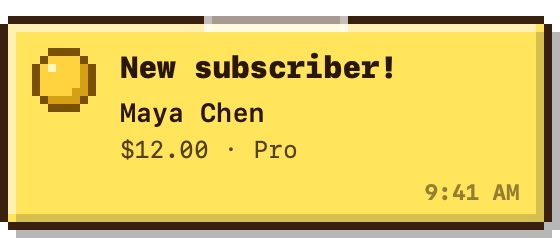
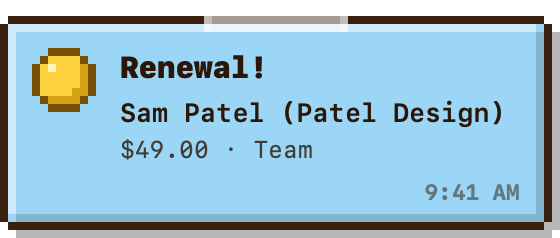
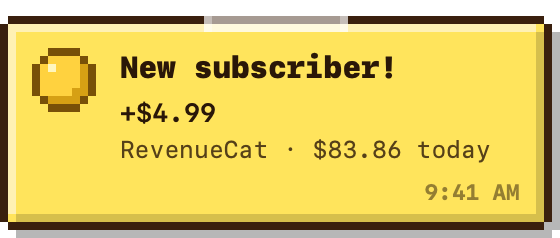
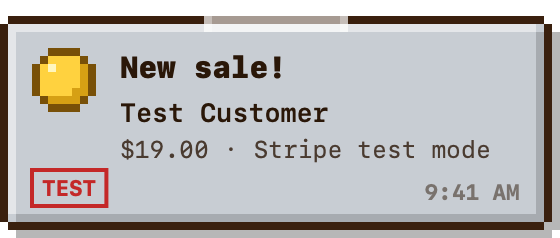
Your keys stay on your Mac
Slap Alert keeps your key in the macOS keychain and only ever sends it to api.stripe.com or api.revenuecat.com. There is no account to make.
Stripe is checked every 30 seconds, RevenueCat every minute, and Shopify orders arrive through a webhook within about 30 seconds. Only payments made after you connect get a slap.
Free for your own scripts
Anything can make him slap: drop a small JSON file in his inbox folder and the note appears. Signups, deploys, a big order on your Shopify. This part is always free.
~/Library/Application Support/Slap Alert/Inbox/
{"kind": "onboarding", "headline": "New signup!",
 "who": "Alex Rivera", "detail": "From your own script"}
Slap Alert
One-time purchase
Pay once. No subscription.
- Stripe, RevenueCat and Shopify
- Use it on all of your own Macs
- For Macs running macOS 14 Sonoma or later
- Free trial for 7 days before you pay
- Your license key arrives right after checkout
- Full refund within 14 days, no questions asked
Secure checkout by Stripe · Terms
Questions
How much does Slap Alert cost?
Slap Alert is a one-time purchase, currently US$19, with no subscription. You can try it free for 7 days first, and one license works on all of your own Macs.
How do I get a notification for every Stripe sale on my Mac?
Open Slap Alert, paste a read-only Stripe key (a restricted key with Charges: Read and Invoices: Read, nothing else), and make a sale. Slap Alert checks Stripe every 30 seconds, and a pixel monkey slaps a sticky note on your screen showing who paid and how much. Only payments made after you connect get a slap.
Does Slap Alert work with RevenueCat?
Yes. Paste a RevenueCat V2 secret key with Charts & metrics: Read and the monkey slaps when today's revenue goes up, usually within a minute or two. For a note that shows who bought what, set up RevenueCat's webhook in Slap Alert's Connect Sales… window (Slap Alert 1.3 or later).
Does Slap Alert work with Shopify?
Yes, in Slap Alert 1.3 or later. In Connect Sales…, choose Shopify and paste the signing key from your Shopify admin (Settings → Notifications → Webhooks), then add an Order creation webhook with the address Slap Alert shows you. Every new order slaps a note with the order number, the amount and the customer within about 30 seconds. You don't need to make a Shopify app.
Is it safe to give Slap Alert my Stripe key?
Yes. The key is read-only, so it can't move money, and Slap Alert refuses full secret keys. It is stored in your Mac's keychain and only ever sent to api.stripe.com or api.revenuecat.com.
What happens after the 7-day trial?
Stripe, RevenueCat and Shopify slaps pause until you add a license. Slaps from your own scripts keep working.
How do I add my license?
After checkout you'll see your key with an Activate in Slap Alert button. Or open the monkey's menu, choose Buy or Enter License…, and paste the key.
Can I get a refund?
Yes. Email hello@slapalert.com within 14 days of buying and you get a full refund, no questions asked.
Does it need the internet or a server?
It needs the internet to ask Stripe or RevenueCat about new payments. The license is checked on your Mac, offline.
I sell through both Stripe and RevenueCat.
Connect both. If RevenueCat already tracks your Stripe sales, connect just one, or each sale gets two slaps.
Can it announce things other than Stripe, Shopify or RevenueCat sales?
Yes. Drop a small JSON file in the Slap Alert Inbox folder and a note appears, so your own scripts can announce signups, deploys or a big order. This part is always free.
Which Macs does it run on?
Slap Alert is a Mac app that lives in the menu bar and needs macOS 14 Sonoma or later.
Can he be quieter?
Yes: turn the sound off, pick a smaller monkey, or hide him so he only appears for a sale.
Get updates about Slap Alert
Hear when new versions and features come out, plus the occasional offer.