 Slap Alert
Buy
Slap Alert
Buy
RevenueCat sale notifications on your Mac
Paste a RevenueCat V2 secret key with Charts & metrics: Read and the monkey slaps when today's revenue goes up, usually within a minute or two. For a note that shows who bought what, set up RevenueCat's webhook in Connect Sales… (in the version downloaded from slapalert.com).
For macOS 14 Sonoma or later · One-time purchase, currently US$19 · 7-day free trial · Full refund within 14 days
Two ways to connect
-
Today's revenue
The key must be a V2 secret key with Charts & metrics → overview: Read. RevenueCat shares today's revenue, not single purchases, so the monkey slaps when that number goes up. It can lag a minute or two. RevenueCat is checked every minute.
-
Who bought what
Needs the Slap Alert downloaded from slapalert.com. In Connect Sales… press Set up on the RevenueCat purchases row. In RevenueCat open Project settings → Integrations → Webhooks → New webhook, paste the Webhook URL and the Authorization header value Slap Alert shows, pick Production and Sandbox, save, then press Send test event.
-
Don't slap twice
While the purchase webhook is on, the revenue-watching connection stays quiet. If RevenueCat already tracks your Stripe sales, connect just one of them, or each sale gets two slaps.
The note he slaps
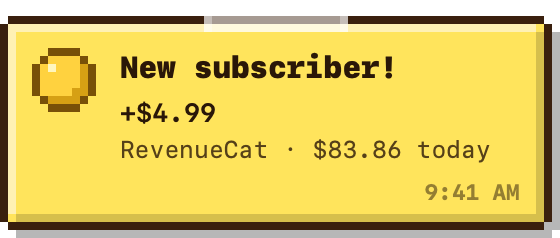
Where it goes
The V2 key is stored in your Mac's keychain and is only sent to api.revenuecat.com. Purchase notes, the ones that name who bought, come through a small Slap Alert relay; the privacy policy says what it keeps. If you only use Stripe, Paddle or App Store sales, your Mac never contacts the relay.
Questions
Does Slap Alert work with RevenueCat?
Yes. Paste a RevenueCat V2 secret key with Charts & metrics: Read and the monkey slaps when today's revenue goes up, usually within a minute or two. For a note that shows who bought what, set up RevenueCat's webhook in Slap Alert's Connect Sales… window (in the version downloaded from slapalert.com).
Which RevenueCat key does Slap Alert need?
The key must be a V2 secret key with Charts & metrics → overview: Read. RevenueCat shares today's revenue, not single purchases, so the monkey slaps when that number goes up. RevenueCat is checked every minute. The key is stored in your Mac's keychain and is only sent to api.revenuecat.com.
How do I see who bought on RevenueCat?
Needs the Slap Alert downloaded from slapalert.com. In Connect Sales… press Set up on the RevenueCat purchases row. In RevenueCat open Project settings → Integrations → Webhooks → New webhook, paste the Webhook URL and the Authorization header value Slap Alert shows, pick Production and Sandbox, save, then press Send test event. While this is on, the revenue-watching connection stays quiet so nothing slaps twice.
Let him slap your next sale
One-time purchase, currently US$19 · 7-day free trial · Full refund within 14 days, no questions asked · Stripe · Paddle · Shopify · App Store