 Slap Alert
When you work alone, small interruptions add up, and a few Mac menu bar apps can take care of them. The Mac going to sleep in the middle of an upload. Losing something you copied ten minutes ago. Dragging windows around by hand.
These are well-known Mac menu bar apps that founders often mention for exactly that kind of thing. I built one of them, Slap Alert, and I'll say so when I get to it. For the rest, I'm sticking to what each app's own page says it does and what it costs.
Why do founders like menu bar apps?
The menu bar is the one strip of screen that's always there, whatever app you're in. A small icon up there stays out of the way until you need it. That suits tools you reach for many times a day but don't want to think about.
Keep the Mac awake through a long upload: Amphetamine
Amphetamine keeps your Mac, and optionally the display, awake. You can start a session from its menu for a set time, until a file finishes downloading, or while a certain app is running. It can also do it automatically, like whenever an external display is connected.
Price: free on the Mac App Store, with no in-app purchases.
Find something you copied an hour ago: Maccy
Maccy is a clipboard manager. It keeps your copy history, and you type to search it and press Enter to paste. If your password manager clears a copied password, Maccy drops it too.
Price: free and open source (MIT) from maccy.app. There's also an App Store version. It needs macOS 14 Sonoma or later.
Snap windows with a shortcut: Rectangle
Rectangle moves and resizes windows with keyboard shortcuts, or by dragging a window to a screen edge or corner.
Price: free and open source. There's a paid Rectangle Pro with extra features and a 10-day free trial.
See your day at a glance: Itsycal
Itsycal is a tiny calendar in the menu bar. It works with the Mac Calendar app, shows your events, and lets you join virtual meetings from it.
Price: check mowglii.com/itsycal (I couldn't confirm a price on its page).
Hear every sale: Slap Alert
Full disclosure, I built this one.
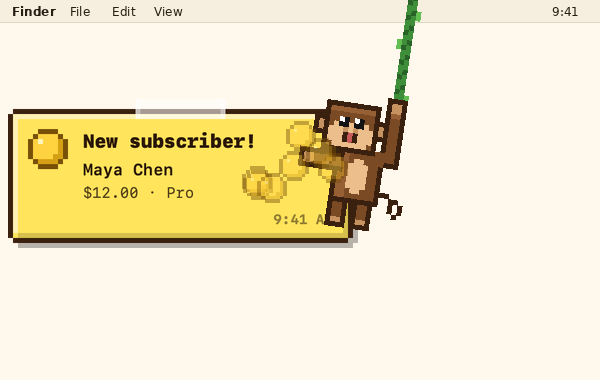
When a sale comes in, a pixel monkey swings down from the top-right corner of your screen and slaps a sticky note with who paid and how much. It works with Stripe, Paddle, Polar, Dodo Payments, RevenueCat, Shopify (in the slapalert.com download) and the App Store. You can also show today's sales total next to the monkey in the menu bar, and pick a sound for each sale, like a cha-ching (you can hear them on my sounds page). Any sale can become an image with your logo and the sale on it, ready to share to your socials. Nothing posts on its own.
Price: free, with paid upgrades after 7 days, for the monkey, sounds, sharing and one sales connection, with a 7-day trial of the paid features on the slapalert.com download. It's also on the Mac App Store. It needs macOS 14 Sonoma or later. More on the home page.
It's the one I use every day, but I made it, so take that with a grain of salt.
See what's eating your CPU: Stats
Stats is a system monitor that lives in the menu bar, covering things like CPU, GPU, disk, network, battery, fans and sensors.
Price: free and open source (MIT), on GitHub.
How do I keep my menu bar from getting crowded?
Add a few of these and the menu bar fills up fast. On a MacBook with a notch, icons that don't fit just disappear behind it.
Two well-known menu bar managers deal with that:
- Ice is a free, open-source menu bar manager (GPL-3.0).
- Bartender is a paid menu bar manager with a 4-week free trial. It can automatically hide items that the notch would cover, and bring them back with a click or a hotkey.
Questions
What are the best Mac menu bar apps?
It depends on what gets in your way. A keep-awake app, a clipboard manager, a window snapper and a menu bar manager cover a lot of the usual annoyances, and each of those has a free option above.
Are menu bar apps safe?
Get them from the Mac App Store or the developer's own site, and check what permissions they ask for. Several here are open source, so the code is public.
Why do my menu bar icons disappear?
On a Mac with a notch, icons that don't fit get hidden behind it. A menu bar manager like Ice or Bartender can help.
Can I see my Stripe sales in the Mac menu bar?
There's no Stripe app for the Mac. I wrote about the options in Is there a Stripe app for Mac?. Slap Alert can show today's sales total in the menu bar.
This week's roundup has a menu bar pet that lives on your battery: what's working, week of Nov 12. For more small Mac apps worth a look, here are 5 cool indie apps I found on X this week.
Happy building, friends.
Newt
Leave a comment