 Slap Alert
Short answer: Paddle doesn't make a Mac app. Its built-in option is a notification destination that emails you, or calls a webhook, when a transaction completes. For an alert on the Mac itself, use a menu-bar app with a read-only Paddle Billing key: Slap Alert checks Paddle every 30 seconds and slaps a note on your screen with a sound for each sale.
If you sell through Paddle, you probably know the routine. Open the dashboard, look at transactions, see nothing new, close it, open it again ten minutes later.
Here's every way I know to stop doing that, starting with what Paddle gives you for free. I checked every other tool's facts on its own site or App Store page on November 2, 2026.
Does Paddle send sale notifications?
Yes, but by email or webhook, not by app. Paddle calls these notification destinations. Each one is either a webhook URL or an email address, and you pick which events it gets.
I couldn't find an official Paddle app for Mac or phone on Paddle's site. There's a third-party iPhone app called Paddly, which I cover below. Paddly's own listing says it isn't associated with Paddle.
How do I get an email for every Paddle sale?
- In Paddle, go to Developer tools, then Notifications, and click New destination.
- Set the notification type to Email and enter your address.
- Tick
transaction.completedand save.
One gotcha: Paddle's simulated events only go to webhook destinations, not email ones. So you won't get a test email. The first email shows up with your first real sale.
Email works. It's also a sale sitting in the same pile as receipts and newsletters, like a birthday card left in the junk drawer.
How do I get a Paddle alert on my Mac?
Use an app that reads your Paddle account with a read-only API key. Nothing has to stay open in a browser, and there's no server to run.
Slap Alert is mine, so weigh this part accordingly. It's a Mac menu-bar app. A pixel-art monkey hangs from a vine in the top-right corner of your screen. When a Paddle sale completes, he swings down and slaps a sticky note with who paid and how much.
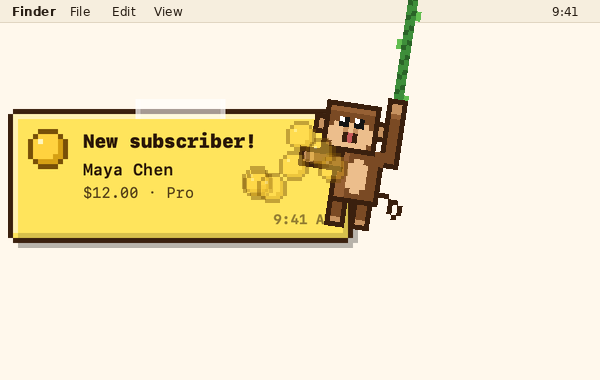
- Timing. Paddle is checked every 30 seconds, so a sale shows up within about half a minute.
- Sound. The direct download has Slap (the default), Cha-ching, Register, Pop, 8 more or Off. There's a Volume slider in the Sound menu, from 0 to 100%.
- Where it shows. The note floats over your windows, on every Space and over full-screen apps. It never takes focus, and it stays until you click it.
- Test first. A Paddle sandbox key works too. Its notes are grey and stamped TEST.
- Only new sales. Sales made before you connect don't slap.
Which Paddle permissions does Slap Alert need?
Two, both read-only: Transactions: Read and Customers: Read. Create the key in Paddle under Developer tools, then Authentication, and paste it into Connect Sales… in the monkey's menu.
The key stays in your Mac's keychain and only goes to Paddle. There's no Slap Alert account to make. The Paddle setup page has the full steps.
What doesn't Slap Alert do with Paddle?
Better you hear it from me now than after you buy.
- Paddle Billing only. Paddle Classic isn't supported.
- No Paddle history. The Revenue window's Today, This Week, This Month and All Time figures (part of the paid upgrades) come from Stripe and RevenueCat. Paddle shows as a gap there, not a false zero.
- No Paddle MRR. MRR and ARR come from Stripe and RevenueCat only.
- Bad news is partial. You get a quiet note when a Paddle subscription goes past due, but not for Paddle refunds.
- No trials or cancellations. Paddle $0 transactions are skipped, and there are no cancellation alerts.
If you need Paddle MRR on your Mac, NotchBuddy and MRRDock say they show it.
Slap Alert vs other ways to get Paddle sale alerts
| Slap Alert | Paddle email destination | NotchBuddy | MRRDock | Paddly | BetterNotif | |
|---|---|---|---|---|---|---|
| What you get | A sticky note on your Mac screen with a sound, per sale | An email per event | A pill in the MacBook notch (or a small pill on other Macs) with a sound | An MRR total in the menu bar | Push notifications on iPhone or iPad (premium) | Native macOS notifications |
| Per-sale alert | Yes | Yes | Yes | No, MRR total. Milestones and a daily summary go to Discord or Slack | Yes, with premium | Not yet for Paddle: its site lists Paddle as "Soon" |
| How often it checks Paddle | Every 30 seconds | When the event fires | About every 90 seconds | Every 15 minutes | Not stated | n/a |
| Paddle MRR | No | No | Yes | Yes | Not stated | n/a |
| Other sources | Stripe, Polar, Dodo Payments, Lemon Squeezy (beta), RevenueCat, Shopify (direct download), a daily App Store note | None | Stripe, RevenueCat, Lemon Squeezy, Polar, Dodo Payments, Gumroad, App Store Connect | Stripe, RevenueCat, Lemon Squeezy, Polar, Dodo Payments, Gumroad | None | Stripe, Polar |
| Price | Free; paid upgrades after 7 days | Free | US$10 once direct; Mac App Store free, then US$19.99 unlock | Free, open source | Free; in-app purchases from US$4.99 | US$9.99 once |
| Runs on | macOS Sonoma or later | Any inbox | macOS Sonoma or later | macOS Sonoma or later | iPhone, iPad; Apple silicon Macs | macOS Monterey or later |
What I'd do: if you only sell on Paddle and email is enough, use Paddle's email destination. It's free and it's already there. If you want the sale to land on your screen while you work, pick a Mac app. Want it loud and impossible to miss? Slap Alert. Want MRR in a glance? NotchBuddy or MRRDock.
Can I share a Paddle sale?
Yes. Every real sale note has a Share button. It makes an image with your logo and the sale on it, so you don't have to screenshot the Paddle dashboard and crop out a customer's email. Post it to X, Threads, Bluesky, LinkedIn or Reddit. You can also just copy or save it. Nothing posts on its own. Amounts stay hidden until you turn them on, and customer names never appear.
Questions
Does Paddle have a Mac app?
I couldn't find one on Paddle's site. Paddle's built-in alerts are notification destinations, which send an email or call a webhook URL for the events you choose.
Can Paddle email me when I make a sale?
Yes. Create a notification destination with the type set to Email and subscribe it to transaction.completed. Paddle's simulated events only go to webhook destinations, so the first email comes with a real sale.
How fast does Slap Alert show a Paddle sale?
Within about 30 seconds. It checks Paddle Billing every 30 seconds with a read-only key.
Does Slap Alert work with Paddle Classic?
No. It supports Paddle Billing only.
Can I test Paddle alerts without a real sale?
Yes. Connect a Paddle sandbox key. Sandbox sales arrive as grey notes stamped TEST.
What is free, and what does the unlock add?
Slap Alert drops to Free after the trial: if Paddle is your first connection, or the one you pick under Connect Sales → Free plan, it keeps its note for each sale, with the monkey, sounds, outfits and sharing. A second connection, a second business, an App Store connection, the Revenue window totals, the money card, refund and failed-payment notes and the weekly sales wall need the paid upgrades, which you can try for 7 days. Slap Alert is free, with paid upgrades after 7 days. You can get a full refund within 14 days by emailing hello@slapalert.com.
More from my blog
- How to set a custom notification sound on a Mac
- What's working for indie founders: week of Nov 12, 2026
- Shopify cha-ching sound on your Mac: every way to get it
Let him slap your next sale
If Paddle pays you and you work on a Mac, download Slap Alert free. Two read-only permissions, one paste, and the next sale comes to you.
More from me: Connect Paddle · Paddle, Polar and Dodo fees compared · Sale notifications compared
Happy building, friends.
Newt
Leave a comment